

Mouse Jiggler Purpose
You’re two hours into a large file download, a Zoom call, or an overnight render job — and then it happens. The screen dims, the system locks, and you’re back to typing in a password just to check on something that should have kept running in the background.
If your laptop or desktop keeps falling asleep, locking the screen, or logging you out of a video call at the worst possible moment, the fix isn’t a registry hack or a background app. It’s a small piece of hardware called a Mouse Jiggler — and it solves the problem the moment you plug it in.
What is a Mouse Jiggler?
A mouse jiggler is a compact USB device that mimics the natural movement of a computer mouse. Your operating system sees this movement as genuine user activity, which stops it from triggering sleep mode, the screen saver, or an auto-lock — all without you ever touching your keyboard or trackpad.
Unlike software-based “stay awake” tools, a hardware mouse jiggler like the MillionHz Mouse Jiggler requires no installation, no admin permissions, and no drivers. You plug it into a USB port, and it starts working immediately.
Why Your Computer Needs One
Every modern operating system — Windows, macOS, and Linux — is designed to sleep or lock after a period of inactivity. It’s a sensible default for battery life and security, but it becomes a real problem in situations like:
- Remote work and virtual meetings — no more “are you still there?” prompts or getting bumped off a call because you stepped away to think.
- IT professionals and developers — long builds, deployments, or remote sessions that shouldn’t be interrupted by a lock screen.
- Large downloads or uploads — keep transfers running without babysitting the mouse every few minutes.
- Online presentations — nothing kills a client pitch like your screen dimming mid-sentence.
- Automation and monitoring tasks — dashboards, scripts, and long-running processes that need an active session to keep working.
If you’ve ever Googled “how to stop my laptop from sleeping” or tried disabling Windows sleep settings manually, a mouse jiggler is the simpler, permanent fix.
How the MillionHz Mouse Jiggler Works
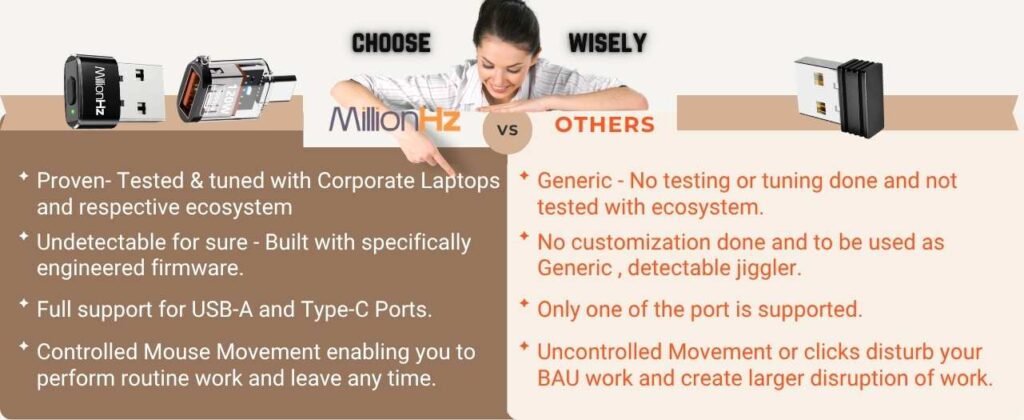
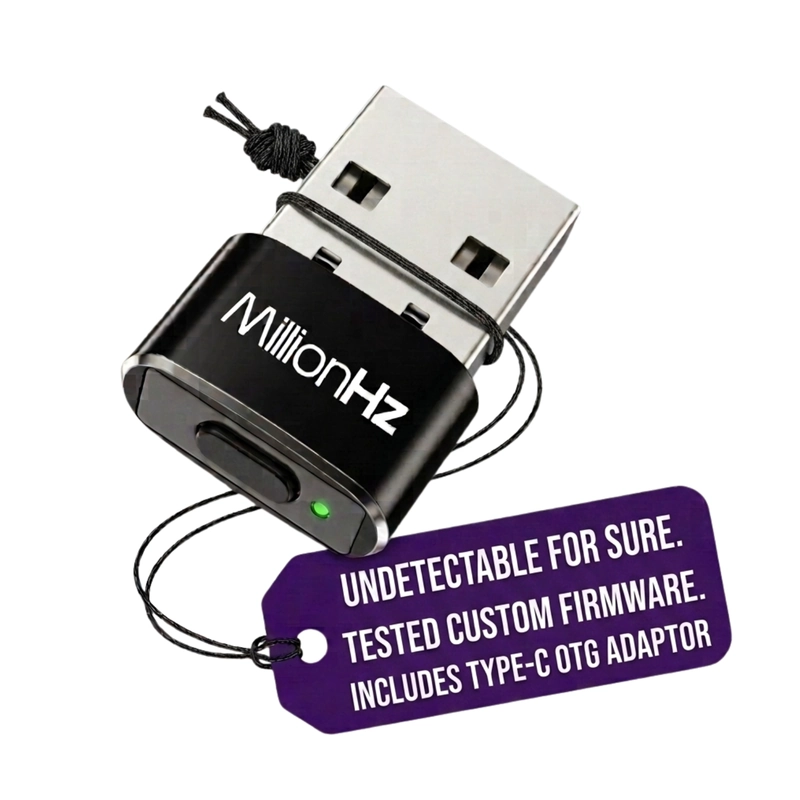
The MillionHz Mouse Jiggler plugs into a USB-A or Type-C port (it comes bundled with a MillionHz OTG adapter, so you’re covered either way) and is recognized by your system as a standard USB mouse. From the moment it’s connected, it sends small, natural movement signals at regular intervals — enough to register as activity, without disrupting your actual cursor position or workflow.
There’s nothing to configure. No software to download. No settings to dig through in Control Panel or System Preferences. It simply works in the background, silently keeping your system active while you focus on your actual work.
Key Features
No Software Required Plug it in and it starts working instantly — no installation, no drivers, no compatibility checks.
Undetectable Operation Your computer recognizes it as a standard input device, so it works quietly across setups without raising flags in most environments.
Prevents Sleep, Screen Savers, and Auto-Lock Keeps your session active so you’re not repeatedly logging back in or losing your place.
Compact and Portable Small enough to slip into a laptop bag or even leave permanently plugged into your dock — built for professionals who move between desks, offices, and home setups.
Multi-Mode Movement Simulates natural, varied cursor behavior rather than a single repetitive motion, so it reads as genuine activity.
Broad Compatibility Works across Windows, macOS, and Linux, with USB-A and Type-C support out of the box.
Mouse Jiggler vs. Software “Stay Awake” Apps
It’s worth understanding why a hardware jiggler is usually the better choice over a keep-awake app:
| MillionHz Mouse Jiggler | Software Apps | |
|---|---|---|
| Installation | None — plug and play | Requires download & install |
| Admin/IT permissions | Not needed | Often blocked on managed devices |
| Works across OS | Windows, macOS, Linux | OS-dependent, needs updates |
| Background resource use | None | Uses RAM/CPU |
| Portability | Carry it anywhere | Tied to one installed device |
On managed corporate laptops, IT policies frequently block the installation of third-party software — which makes a hardware solution like this one the more practical, hassle-free option.
Who Should Use a Mouse Jiggler?
- Remote and hybrid employees who need to stay “active” during long, monitored work sessions
- Software developers and IT admins running long builds, deployments, or SSH sessions
- Sales and support teams on back-to-back video calls
- Students and researchers downloading or processing large datasets overnight
- Content creators exporting or rendering large video files
- Anyone tired of re-entering their password every time they step away for a coffee
Setup Takes Under 10 Seconds
- Plug the MillionHz Mouse Jiggler into a free USB-A port, or use the included OTG adapter for Type-C.
- That’s it — your system now sees continuous, natural input activity.
- Unplug it whenever you want your computer to sleep normally again.
No restarts, no permissions dialogs, no learning curve.
What’s in the Box
- 1x MillionHz USB-A Mouse Jiggler
- 1x MillionHz Type-C OTG Adapter (for Type-C-only devices)
- 1-Year Brand Warranty
Final Thoughts
A mouse jiggler is one of those small tools that quietly solves a daily frustration most people just learn to live with. Instead of adjusting power settings, installing background apps, or manually nudging your mouse every few minutes, the MillionHz Mouse Jiggler handles it automatically — plug it in, and your computer stays awake for as long as you need it to.
Whether you’re on back-to-back calls, running a long download, or just tired of re-logging into your laptop every time you step away, this compact device pays for itself the first time it saves you from an interrupted workflow.
Buy Now
-
Mouse Jiggler | Undetectable | Keeps Laptop Awake
Price range: ₹399.00 through ₹499.00 Inclusive of GST
Leave a Reply